웹 서비스에 접속하면 상단에 CSRF-1라는 메뉴바와 함께 보이는 초기 화면이 나타납니다.

이 페이지는 사용자가 직접 파라미터를 조작할 수 있도록 설계된 입력창으로, 이후 CSRF 공격이나 파라미터 변조 실습을 진행할 수 있는 기본 환경이라고 생각됩니다.

입력창에 올바른 값을 넣어 제출하면 서버로부터 good 이라는 응답이 출력되는 것을 확인할 수 있었다.

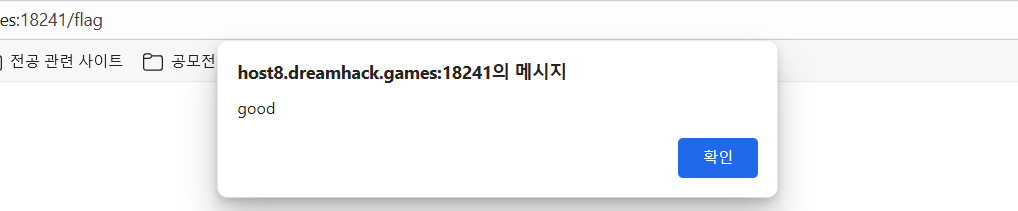
자세한 동작원리를 알기위해서 코드를 확인 해 보았다.
app.py
#!/usr/bin/python3
from flask import Flask, request, render_template
from selenium import webdriver
from selenium.webdriver.chrome.service import Service
import urllib
import os

app = Flask(__name__)
app.secret_key = os.urandom(32)

try:
    FLAG = open("./flag.txt", "r").read()
except:
    FLAG = "[**FLAG**]"


def read_url(url, cookie={"name": "name", "value": "value"}):
    cookie.update({"domain": "127.0.0.1"})
    try:
        service = Service(executable_path="/chromedriver")
        options = webdriver.ChromeOptions()
        for _ in [
            "headless",
            "window-size=1920x1080",
            "disable-gpu",
            "no-sandbox",
            "disable-dev-shm-usage",
        ]:
            options.add_argument(_)
        driver = webdriver.Chrome(service=service, options=options)
        driver.implicitly_wait(3)
        driver.set_page_load_timeout(3)
        driver.get("http://127.0.0.1:8000/")
        driver.add_cookie(cookie)
        driver.get(url)
    except Exception as e:
        driver.quit()
        print(str(e))
        # return str(e)
        return False
    driver.quit()
    return True


def check_csrf(param, cookie={"name": "name", "value": "value"}):
    url = f"http://127.0.0.1:8000/vuln?param={urllib.parse.quote(param)}"
    return read_url(url, cookie)


@app.route("/")
def index():
    return render_template("index.html")


@app.route("/vuln")
def vuln():
    param = request.args.get("param", "").lower()
    xss_filter = ["frame", "script", "on"]
    for _ in xss_filter:
        param = param.replace(_, "*")
    return param


@app.route("/flag", methods=["GET", "POST"])
def flag():
    if request.method == "GET":
        return render_template("flag.html")
    elif request.method == "POST":
        param = request.form.get("param", "")
        if not check_csrf(param):
            return '<script>alert("wrong??");history.go(-1);</script>'

        return '<script>alert("good");history.go(-1);</script>'


memo_text = ""


@app.route("/memo")
def memo():
    global memo_text
    text = request.args.get("memo", None)
    if text:
        memo_text += text
    return render_template("memo.html", memo=memo_text)


@app.route("/admin/notice_flag")
def admin_notice_flag():
    global memo_text
    if request.remote_addr != "127.0.0.1":
        return "Access Denied"
    if request.args.get("userid", "") != "admin":
        return "Access Denied 2"
    memo_text += f"[Notice] flag is {FLAG}\n"
    return "Ok"


app.run(host="0.0.0.0", port=8000)
📌 코드 동작 설명
- 기본 페이지(/)
– index.html을 렌더링하여 초기 화면을 보여줍니다. - 취약 페이지(/vuln)
– param 값을 받아 출력하는데, frame, script, on 같은 문자열만 필터링합니다.
– 즉, 단순 문자열 치환 필터만 존재하여 XSS 우회가 가능합니다. - 플래그 요청(/flag)
– 사용자가 param을 POST로 제출하면 check_csrf() 함수를 통해 URL 접근이 이뤄집니다.
– 내부적으로는 Selenium WebDriver(Chrome headless) 를 이용해 브라우저를 실행하고, http://127.0.0.1:8000/vuln?param=...에 접속합니다.
– 정상적으로 동작하면 good 알림창이 뜨고, 실패하면 wrong??이 뜨도록 설계되어 있습니다. - 메모 기능(/memo)
– memo 파라미터에 입력된 값을 전역 변수 memo_text에 계속 추가합니다.
– 이후 memo.html로 출력되므로, 공격자가 스크립트를 삽입할 수 있습니다. - 관리자 페이지(/admin/notice_flag)
– 요청한 클라이언트가 로컬(127.0.0.1) 이고, userid=admin일 때만 접근 허용.
– 접근 시 메모에 [Notice] flag is {FLAG} 형태로 플래그가 기록됩니다.
코드를 보면 param 부분에 값이 필터링 없이 그대로 반영되는 지점이 존재하므로, 여기에 XSS 페이로드를 삽입하여 관리자가 /admin/notice_flag 페이지에 접근했을 때 FLAG를 획득할 수 있음을 알 수 있다.
✅ 페이로드
<img src="/admin/notice_flag?userid=admin">👉 의미·원리
- /flag에 param으로 위 태그를 제출하면, 서버 내부 로직이 http://127.0.0.1:8000/vuln?param=... 를 Selenium(관리자 브라우저 역할) 로 렌더링합니다.
- <img>의 src 요청은 자동으로 발생하므로, 관리자의 로컬 환경에서 /admin/notice_flag?userid=admin 에 접근이 이루어집니다.
- 이때 서버는 memo_text에 [Notice] flag is {FLAG} 를 기록합니다.
- 참고: /vuln은 frame/script/on만 치환 필터 → <img>는 차단되지 않음.
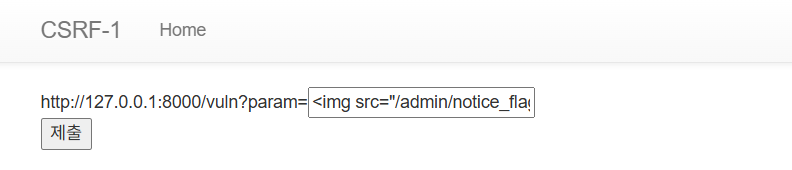
최종적으로 관리자 브라우저를 강제로 /admin/notice_flag 로 이동시켜 플래그를 획득하는 데 성공하였습니다.

'Dreamhack > 웹해킹' 카테고리의 다른 글
| [LEVEL 1] image-storage (0) | 2025.09.04 |
|---|---|
| [LEVEL 1] xss-1 (0) | 2025.09.03 |
| [LEVEL 1] simple_sqli (0) | 2025.09.02 |
| [LEVEL 1] proxy-1 (1) | 2025.08.31 |
| [LEVEL 1] Disgusting Ads (0) | 2025.08.28 |