문제 설명에 따르면 STEP 1~2를 거쳐 FLAG 페이지에 도달하면 플래그가 출력됩니다.
모든 단계를 통과하여 플래그를 획득하세요. 플래그는 flag.txt 파일과 FLAG 변수에 있습니다.
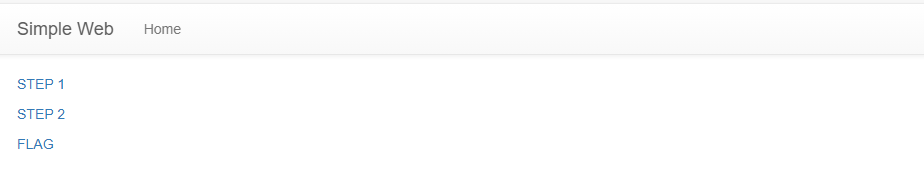
웹 서비스에 접속하면 아래와 같은 화면이 표시됩니다.
STEP 1을 들어가게 되면 아래와 같은 화면이 나오고 STEP 2와 FLAG 를 들어가면 밑의 처럼 Not yet 화면이 나오게 된다.
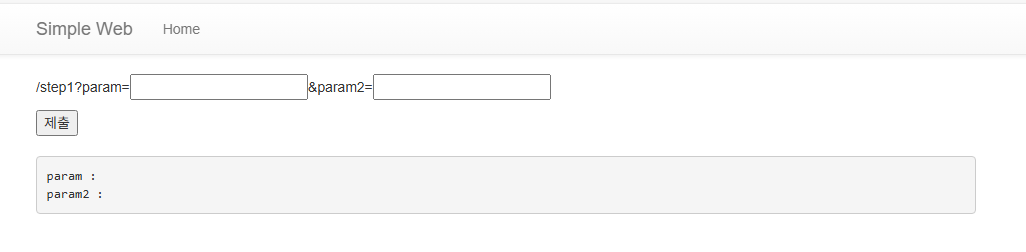

단순히 표면적인 정보만으로는 부족했기 때문에, 보다 확실한 이해를 위해 문제 파일을 직접 살펴보기로 했습니다.
app.py
#!/usr/bin/python3
import os
from flask import Flask, request, render_template, redirect, url_for
import sys

app = Flask(__name__)

try:
    # flag is here!
    FLAG = open("./flag.txt", "r").read()
except:
    FLAG = "[**FLAG**]"


@app.route("/")
def index():
    return render_template("index.html")


@app.route("/step1", methods=["GET", "POST"])
def step1():

    #### 풀이와 관계없는 치팅 방지 코드
    global step1_num
    step1_num = int.from_bytes(os.urandom(16), sys.byteorder)
    ####

    if request.method == "GET":
        prm1 = request.args.get("param", "")
        prm2 = request.args.get("param2", "")
        step1_text = "param : " + prm1 + "\nparam2 : " + prm2 + "\n"
        if prm1 == "getget" and prm2 == "rerequest":
            return redirect(url_for("step2", prev_step_num = step1_num))
        return render_template("step1.html", text = step1_text)
    else:
        return render_template("step1.html", text = "Not POST")


@app.route("/step2", methods=["GET", "POST"])
def step2():
    if request.method == "GET":

    #### 풀이와 관계없는 치팅 방지 코드
        if request.args.get("prev_step_num"):
            try:
                prev_step_num = request.args.get("prev_step_num")
                if prev_step_num == str(step1_num):
                    global step2_num
                    step2_num = int.from_bytes(os.urandom(16), sys.byteorder)
                    return render_template("step2.html", prev_step_num = step1_num, hidden_num = step2_num)
            except:
                return render_template("step2.html", text="Not yet")
        return render_template("step2.html", text="Not yet")
    ####

    else:
        return render_template("step2.html", text="Not POST")


@app.route("/flag", methods=["GET", "POST"])
def flag():
    if request.method == "GET":
        return render_template("flag.html", flag_txt="Not yet")
    else:

        #### 풀이와 관계없는 치팅 방지 코드
        prev_step_num = request.form.get("check", "")
        try:
            if prev_step_num == str(step2_num):
        ####

                prm1 = request.form.get("param", "")
                prm2 = request.form.get("param2", "")
                if prm1 == "pooost" and prm2 == "requeeest":
                    return render_template("flag.html", flag_txt=FLAG)
                else:
                    return redirect(url_for("step2", prev_step_num = str(step1_num)))
            return render_template("flag.html", flag_txt="Not yet")
        except:
            return render_template("flag.html", flag_txt="Not yet")


app.run(host="0.0.0.0", port=8000)
이 코드를 보게 되면 prm1는 getget / prm2에는 rerequest를 넣으면 되는 것이다.
 if request.method == "GET":
        prm1 = request.args.get("param", "")
        prm2 = request.args.get("param2", "")
        step1_text = "param : " + prm1 + "\nparam2 : " + prm2 + "\n"
        if prm1 == "getget" and prm2 == "rerequest":
            return redirect(url_for("step2", prev_step_num = step1_num))
        return render_template("step1.html", text = step1_text)
    else:
        return render_template("step1.html", text = "Not POST")
그러면 다음 스텝인 STEP 2로 넘어가는 것을 확인 할 수 있다.

여기서도 마찬가지로 코드를 보게되면 prm1에는 poost / prm2에는 requeeest를 넣으면 플래그가 나오는 것을 확인 할 수 있다.
               prm1 = request.form.get("param", "")
                prm2 = request.form.get("param2", "")
                if prm1 == "pooost" and prm2 == "requeeest":
                    return render_template("flag.html", flag_txt=FLAG)
                else:
                    return redirect(url_for("step2", prev_step_num = str(step1_num)))
            return render_template("flag.html", flag_txt="Not yet")
        except:
            return render_template("flag.html", flag_txt="Not yet")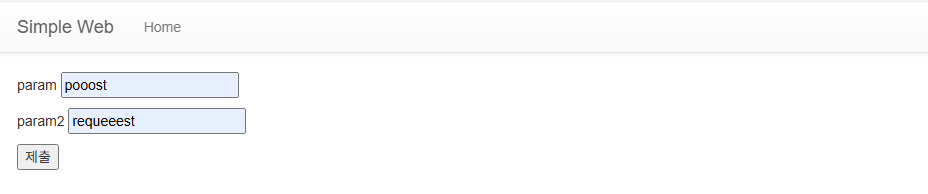

마지막으로 코드를 확인하면서 플래그를 획득할 수 있었는데, 결론적으로는 단순해서 약간 당황했다.
'Dreamhack > 웹해킹' 카테고리의 다른 글
| [🌱Beginner] Flying Chars (0) | 2025.08.25 |
|---|---|
| [🌱Beginner] ex-reg-ex (0) | 2025.08.22 |
| [🌱Beginner] session (0) | 2025.08.22 |
| [🌱Beginner] command-injection-1 (0) | 2025.08.19 |
| [🌱Beginner] web-misconf-1 (0) | 2025.08.19 |